How Much RAM Do You Really Need for a Home Linux Server?
RAM prices are through the roof right now, and that makes choosing memory for a home hobby server surprisingly tricky. Do you buy more RAM than you need “just in case,” or try to save money and hope you won’t run into limits later?
In this post, I’ll look at how much RAM a home server actually needs in practice. I’ll share real memory usage from my own hobby server, explain what workloads truly consume RAM, and give some practical recommendations based on real-world experience.
I’ll also briefly touch on whether DDR4 is still a sensible choice, when DDR5 makes sense, and how to avoid overspending if your server is mainly for learning, experimenting, and running a few fun services at home.
📑 Table of Contents
- 🛠️ My Hobby Homeserver Setup
- 🤔 How Much RAM Does a Home Server Actually Need?
- 🧱 DDR4 vs DDR5: What Actually Matters for a Home Server
- 💻 RAM Recommendations for a Hobby Home Server
- 🧩 Final Thoughts
🛠️ My Hobby Home Server Setup
To put the memory numbers in this post into perspective, it helps to briefly explain what my home server actually looks like. This isn’t a big enterprise setup, just a small and affordable Linux-based server built purely for hobby use.
It runs Linux and mainly hosts self-hosted services. Most workloads are containerized with Docker, which is a practical and common approach for home servers. There are no VM clusters or heavy enterprise workloads here, just services many home server enthusiasts will recognize.
On a day-to-day basis, the server runs:
- A media stack (Jellyfin, Sonarr, Radarr, and supporting services)
- qBittorrent routed through a Gluetun VPN container
- This Ghost blog and Umami analytics
- Netdata for system monitoring
- AdGuard Home for network-wide ad blocking
- Home Assistant
- Tailscale for secure remote access
- A few other small supporting services
The server runs 24/7 and is rarely completely idle. Even when nothing is actively being used, containers stay up, databases remain warm in memory, and Linux continues caching recently accessed data. That makes it a pretty realistic baseline for seeing how RAM is actually used on a hobby home server.
🤔 How Much RAM Does a Home Server Actually Need?
Instead of guessing how much RAM a home server might need, I decided to measure how my own Linux-based hobby server actually uses memory over time. Using Netdata, I monitored memory usage continuously over a 48-hour period while the server was running its normal workloads, media streaming, background tasks, and everyday activity.
Which Services Are Expected to Use the Most RAM?
Looking at the services running on this server, I expected memory usage to be driven mainly by a few heavier workloads. Media services, databases, and always-on background services are often described as the biggest RAM consumers in homelab setups.
In particular, I expected higher usage from:
- Jellyfin, especially during active streaming and transcoding
- qBittorrent, due to disk I/O and filesystem caching
- Databases (MySQL and PostgreSQL), which keep frequently accessed data in memory
- Home Assistant, which runs continuously and builds up history over time
These are usually the services that make people think they need large amounts of RAM.
48 Hours of Real-World Memory Usage
To see what really happens, I tracked memory usage over a full 48-hour period, covering both quiet moments and busier periods.
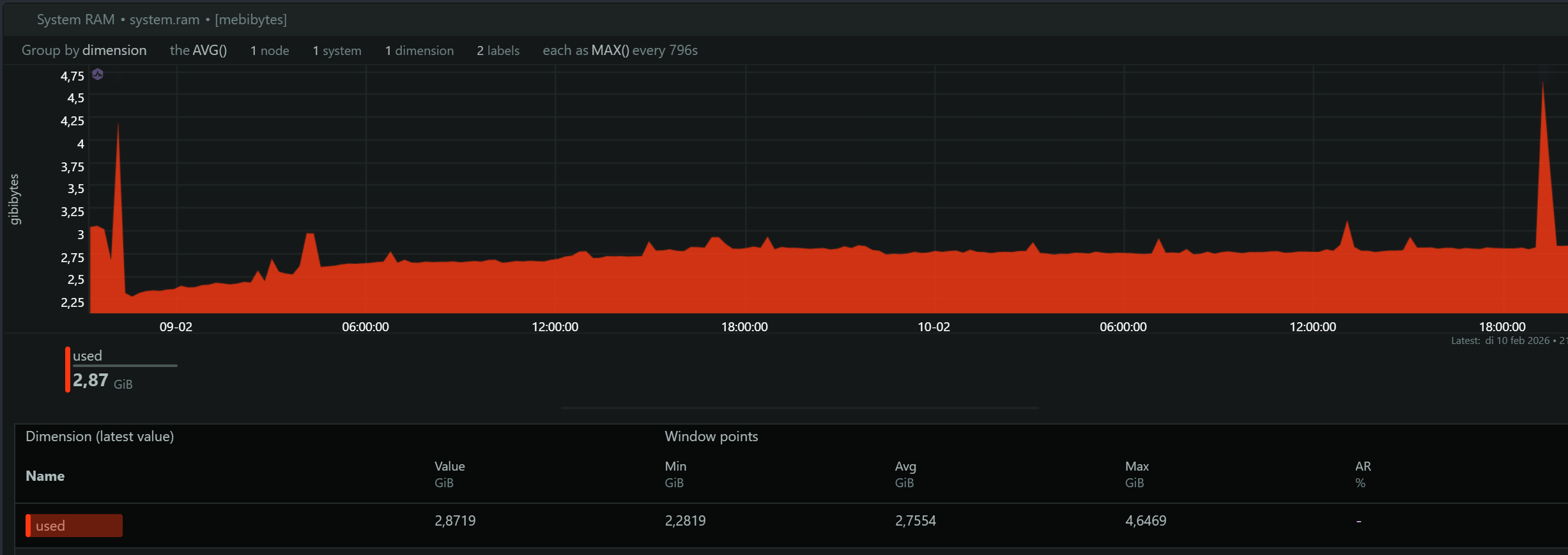
What surprised me most was how modest the actual application memory usage remained. Even during active use, including multiple Jellyfin streams and ongoing transcoding, the server never exceeded 5 GB of used memory.
What This Means in Practice
Based on these measurements, a hobby home server doesn’t necessarily need huge amounts of RAM. But available memory does influence caching and disk I/O, which affects overall responsiveness.
- 8 GB works for a small, light setup. Applications may stay within limits, but there’s little room left for caching, so the system relies more on disk I/O during heavier moments.
- 16 GB feels comfortable. Services run smoothly, and there’s enough room for filesystem and database caching, reducing disk access.
- 32 GB adds generous headroom. The system handles peaks more gracefully and relies less on aggressive cache reclaiming.
- 64 GB is beyond what most hobby workloads truly need, but Linux will still use it effectively for caching, further minimizing disk activity.
The key takeaway: on Linux, extra RAM rarely sits idle. Even if applications don’t need it directly, the system uses it for caching, improving stability and responsiveness rather than simply increasing raw application memory usage.
🧱 DDR4 vs DDR5: What Actually Matters for a Home Server
When choosing RAM for a home server, it’s easy to get drawn to newer standards or higher speeds. In reality, most hobby workloads are limited by CPU performance or disk I/O, not memory bandwidth or latency.
Memory Pressure and Real-World Behavior
During the 48-hour measurement period, application memory usage stayed low, even with multiple Jellyfin streams and active transcoding. To make sure memory wasn’t quietly becoming a bottleneck, I also checked Linux Memory Pressure Stall Information (PSI), which shows whether processes are actually waiting on memory.
The highest observed memory pressure was about 182 ms, measured during a deliberate stress test with multiple streams and transcoding.
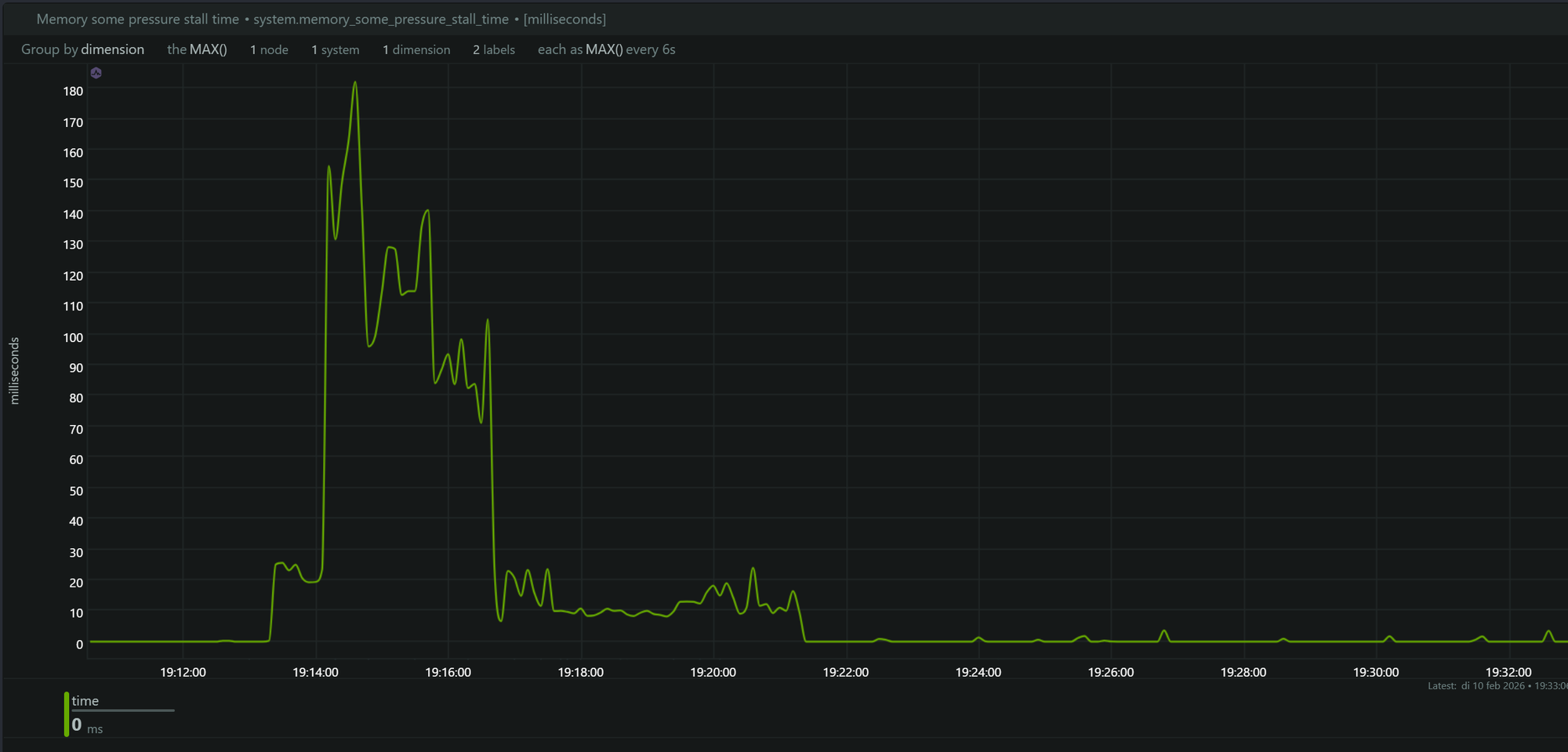
That 182 ms reflects short, accumulated stalls — not a single long pause. At this level, you wouldn’t notice slowdowns, instability, or swap activity. As soon as the load dropped, memory pressure returned to near zero.
DDR4 vs DDR5 in Practice
DDR5 offers higher theoretical bandwidth than DDR4, but it also comes with slightly higher latency and a higher price per gigabyte. For most home server workloads, memory bandwidth simply isn’t the limiting factor.
In this setup, DDR4 was more than sufficient. With enough total memory available, Linux could cache data effectively, reduce disk I/O, and keep the system responsive. Based on these measurements, memory speed wasn’t a practical bottleneck for this kind of hobby server.
💻 RAM Recommendations for a Hobby Home Server
Before anything else, make sure your RAM is compatible with your CPU and motherboard. Check which memory type is supported (DDR4 or DDR5), the maximum capacity, and how many RAM slots you have available.
A Quick Note on ECC Memory
You may come across ECC (Error Correcting Code) memory when researching server hardware. ECC RAM can detect and correct small memory errors before they cause instability or data corruption.
However, ECC requires both CPU and motherboard support, and most consumer hardware does not support it. For hobby home servers running media services, Docker containers, and general self-hosted applications, non-ECC memory is perfectly fine.
If your platform supports ECC and the price difference is small, it’s a nice bonus, but it’s not a requirement for a typical home setup.
Practical Recommendations
-
If you already have a server or most of the hardware
- 8 GB can work if your budget is tight and you still have free RAM slots, but performance may depend more heavily on disk I/O.
- 16 GB is a very comfortable baseline for most hobby setups.
- 32 GB or more gives you extra headroom as your services and data grow over time.
-
Think about your RAM slots
- 2 slots: consider starting with larger modules so you don’t have to replace them later.
- 4 slots: you have more flexibility and can upgrade gradually.
-
If you’re just getting started
Refurbished systems like a Dell OptiPlex 7050 are a cost-effective way to begin. They are affordable, power-efficient, and easy to upgrade.
Budget-Friendly Starting Points Examples
-
4 RAM slots, limited budget: start with 8 GB DDR4 (1 × 8 GB)
Crucial RAM 8GB DDR4 -
2 RAM slots, limited budget: start with 16 GB DDR4 (1 × 16 GB if supported)
Crucial 16GB DDR4 -
Longer-term setup: 32 GB DDR4
Kingston Fury Beast 32GB
The key takeaway is simple: for hobby home servers, capacity usually matters more than speed. Extra RAM won’t sit unused, Linux will actively use it for caching, helping your system stay responsive even when application memory usage looks low.
🧩 Final Thoughts
Choosing the right amount of RAM for a home hobby server really doesn’t have to be complicated. Based on real-world measurements, most common workloads use far less application memory than you might expect. What matters more is having enough total memory for Linux to cache data and handle short spikes smoothly.
In this setup, even during active media streaming and transcoding, memory usage stayed modest and memory pressure remained low. That’s a good reminder that RAM speed and the newest standards often matter less than overall capacity and system balance.
For most hobby home servers, it’s smarter to focus on compatibility, upgrade flexibility, and sufficient capacity instead of chasing the latest hardware. Start with what fits your budget, leave room to grow if you can, and let real-world usage, not assumptions, guide your future upgrades.