How to Enable ActivityPub on a Self-Hosted Ghost 6 Blog
So you’re self-hosting Ghost and just noticed the new ActivityPub option in version 6, only to find out it doesn’t actually work out-of-the-box for self-hosted setups. 😅
Yeah… it’s a bit of a pain in the ass.
💡 Note: Some hosting setups and CDNs (like Cloudflare or other reverse proxies) can cause ActivityPub to fail because of how they handle redirects and headers.
There is a workaround to get it running, but it’s not perfect, we’ll look at what works (and what doesn’t) later in this guide.
In this guide, I’ll show you how I got ActivityPub working on my own Ghost 6 site running on Docker + Nginx, and how you can do the same, step by step, with real configs and curl checks that actually work.
📑 Table of Contents
- 🤔 What is ActivityPub and why does Ghost use it?
- 🪶 Self-Hosting ActivityPub vs Using Ghost’s Gateway
- 🌐 Why ActivityPub Doesn’t Work (and Why We Need a Proxy)
- 🛠️ Docker Compose: config setup
- ☁️ Fixing the Cloudflare Problem (Only if you use cloudflare)
- ✅ Final Thoughts
🤔 What is ActivityPub and why does Ghost use it?
ActivityPub is an open protocol that connects different websites, kind of like how email lets Gmail and Outlook talk to each other.
In social media terms, it’s what powers the fediverse, a network of independent, connected platforms.
Most social networks like Instagram, X (Twitter), or YouTube are centralized, everything runs on one company’s servers.
The fediverse is decentralized: anyone can host their own server and still interact with others.
Examples include Mastodon (Twitter-like), Pixelfed (Instagram-like), and PeerTube (YouTube-like).
So where does Ghost fit in?
Ghost 6 added ActivityPub so your blog can join this network, meaning people on Mastodon can follow your posts directly, like this:
@[email protected]
But Ghost doesn’t run a full ActivityPub server itself.
Instead, it uses ap.ghost.org, a gateway that handles the technical bits (signing, delivery, inbox/outbox) while your Ghost site stays focused on hosting your content.
🪶 Self-Hosting ActivityPub vs Using Ghost’s Gateway
When you hear “ActivityPub,” it’s easy to assume you need to run your own server , but Ghost already does most of the heavy lifting for you through its own gateway, ap.ghost.org.
That gateway takes care of all the complex parts like:
- Cryptographic signing and verification
- Delivering posts to your followers’ servers
- Managing inbox and outbox communication
Your self-hosted Ghost site just needs to connect to that gateway, no extra servers, databases, or message queues required.
You could run your own ActivityPub server using something like Mastodon, GoToSocial, or Akkoma, but that means maintaining a whole social platform with worker queues, databases, and federation logic, which is overkill if all you want is to share your Ghost posts across the fediverse.
That’s why, in this guide, we’ll focus on connecting your self-hosted Ghost instance to Ghost’s own ActivityPub gateway instead of running one yourself.
🌐 Why ActivityPub Doesn’t Work (and Why We Need a Proxy)
So you’ve enabled ActivityPub in Ghost’s settings, published a post, and… nothing happens.
Even the Network tab in Ghost Admin just shows this:
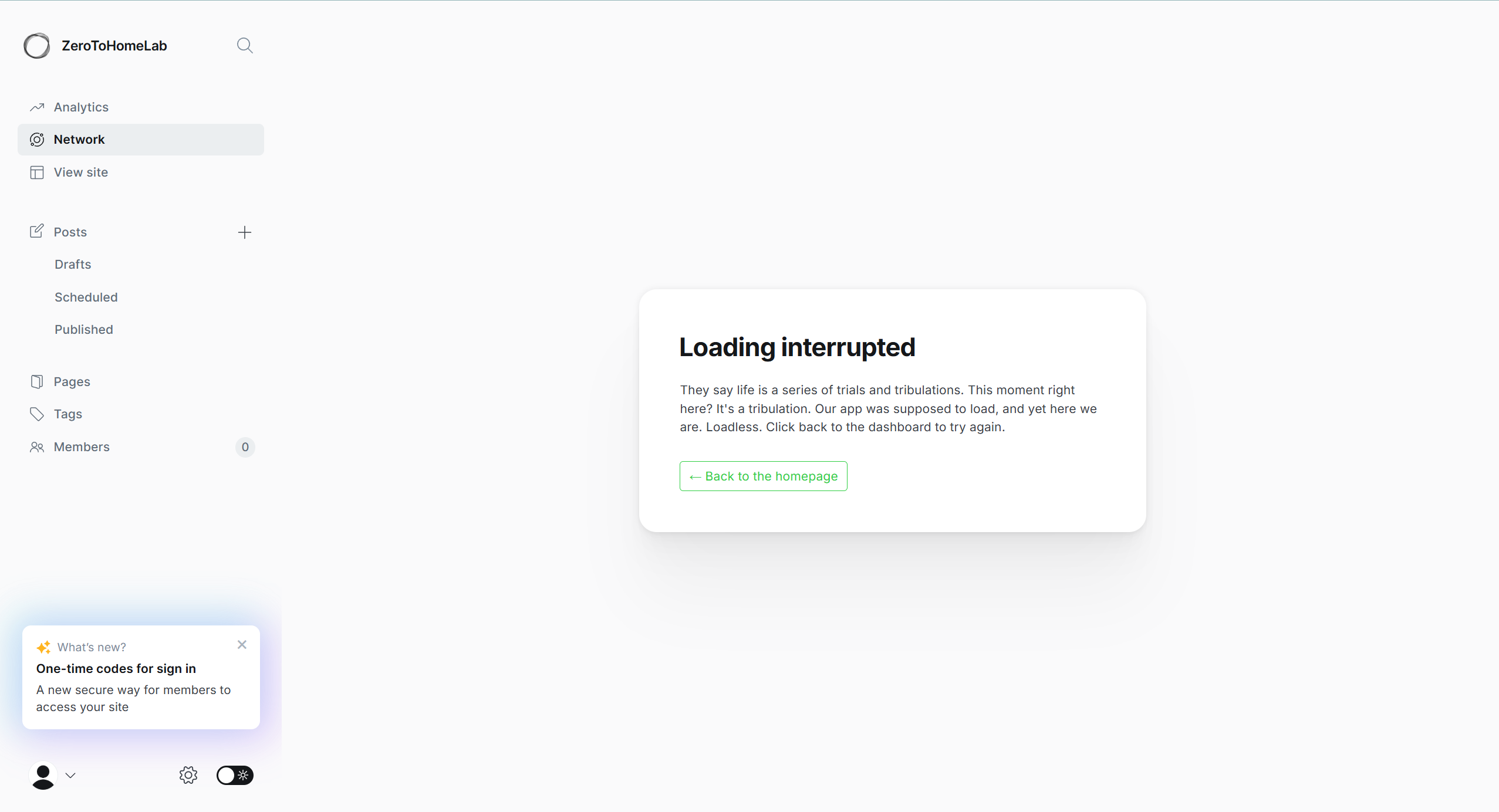
That “Loading interrupted” message is Ghost itself trying to reach its ActivityPub endpoints, like:
https://yourdomain.com/.well-known/webfinger
https://yourdomain.com/.ghost/activitypub/health
But your self-hosted Ghost instance doesn’t actually serve those routes.
They live on ap.ghost.org, Ghost’s shared ActivityPub server.
Since your domain isn’t forwarding these requests yet, Ghost can’t reach its own gateway, and neither can the fediverse.
That’s why ActivityPub “doesn’t work” right after enabling it.
The fix: forward ActivityPub requests to Ghost’s gateway
To make this work, we’ll set up a small Nginx rule that forwards those special routes, like /.well-known/webfinger and /activitypub/* to https://ap.ghost.org.
Once that’s in place, both Ghost Admin and the fediverse will finally get the right responses, and your site will appear as a proper fediverse identity.
🛠️ Docker Compose: config setup
Before forwarding ActivityPub endpoints, get a simple Ghost + Nginx stack running on one origin.
1) docker-compose.yaml
Add the following service to your docker-compose file, add this to the same docker-compose your ghost service is running.
nginx:
    image: nginx:1.29-alpine
    container_name: ghost-nginx
    restart: unless-stopped
    depends_on:
      - ghost
    ports:
      - "127.0.0.1:80:80"
    volumes:
      - ./nginx/ghost.conf:/etc/nginx/conf.d/ghost.conf:ro
💡 Note: In this example I mount my config as ghost.conf.
You could also overwrite Nginx’s built-in /etc/nginx/conf.d/default.conf instead.
- One site only? Overwriting default.conf is the simplest.
- Multiple sites later? Keeping a separate ghost.conf is nicer for organizing configs.
Both work, as long as the file is included from Nginx’s main nginx.conf.
2 Add Nginx config (ghost.conf)
Create ./nginx/ghost.conf with something like this (adjust the domain to your own), I added some comments to give some clarity:
upstream ghost_upstream {
    server ghost:2368;
    keepalive 32;
}

server {
    listen 80;
    server_name yourdomain.com;  # ← change this to your actual domain

    # DNS resolver so Nginx can reach ap.ghost.org over HTTPS
    resolver 1.1.1.1 9.9.9.9 valid=300s;

    # ─────────────────────────────────────────────
    # ActivityPub: Ghost's internal AP gateway
    # Proxies /.ghost/activitypub/* to https://ap.ghost.org
    # ─────────────────────────────────────────────
    location ^~ /.ghost/activitypub/ {
        proxy_pass            https://ap.ghost.org;
        proxy_http_version    1.1;
        proxy_ssl_server_name on;

        # Tell the upstream who we are, but still hit ap.ghost.org
        proxy_set_header Host              ap.ghost.org;
        proxy_set_header X-Forwarded-Host  $host;
        proxy_set_header X-Forwarded-Proto https;   # set to https if TLS terminates in front
        proxy_set_header X-Forwarded-Port  443;
        proxy_set_header X-Forwarded-For   $proxy_add_x_forwarded_for;

        # Forward Authorization for signed / authenticated calls
        proxy_set_header Authorization     $http_authorization;

        # Don’t cache ActivityPub responses (they include signatures)
        add_header Cache-Control "no-store" always;
    }

    # ─────────────────────────────────────────────
    # ActivityPub discovery: WebFinger + NodeInfo
    # /.well-known/webfinger and /.well-known/nodeinfo
    # ─────────────────────────────────────────────
    location ~ ^/.well-known/(webfinger|nodeinfo) {
        proxy_pass            https://ap.ghost.org;
        proxy_http_version    1.1;
        proxy_ssl_server_name on;

        proxy_set_header Host              ap.ghost.org;
        proxy_set_header X-Forwarded-Host  $host;
        proxy_set_header X-Forwarded-Proto https;
        proxy_set_header X-Forwarded-Port  443;
        proxy_set_header X-Forwarded-For   $proxy_add_x_forwarded_for;

        proxy_set_header Authorization     $http_authorization;

        # Don’t cache these discovery responses either
        add_header Cache-Control "no-store" always;
    }

    # ─────────────────────────────────────────────
    # Main Ghost site
    # Proxies everything else to the Ghost container
    # ─────────────────────────────────────────────
    location / {
        proxy_pass         http://ghost:2368;
        proxy_http_version 1.1;

        # Use your public host so Ghost's url/origin logic stays correct
        proxy_set_header Host              $host;
        proxy_set_header X-Forwarded-Host  $host;
        proxy_set_header X-Forwarded-Proto https;   # or $scheme if you're terminating TLS here
        proxy_set_header X-Forwarded-Port  443;     # adjust if not behind TLS on 443
        proxy_set_header X-Forwarded-For   $proxy_add_x_forwarded_for;

        proxy_set_header Connection "";
    }
}
3) Point your domain at Nginx
At this point, all external traffic should go to Nginx, not directly to Ghost.
- Your browser / DNS / CDN should talk to the host running
ghost-nginxon port 80. - The
ghostcontainer is only reachable inside Docker on port 2368.
So in practice:
- If you’re exposing the server directly, point your DNS A/AAAA record for
yourdomain.comto the host where Nginx is running. - If you’re using a CDN or reverse proxy (like Cloudflare), set its origin to the host/port where Nginx is listening (port 80 in this example).
Rule of thumb:
Outside world → Nginx → Ghost
Never outside world → Ghost directly.
4) Test the ActivityPub endpoints
With Docker and Nginx running, you can now test whether your domain correctly proxies to Ghost’s ActivityPub gateway.
Replace yourdomain.com and youruser with your actual values:
# 1. Ghost ActivityPub health check
curl -i 'https://yourdomain.com/.ghost/activitypub/health'

# 2. WebFinger discovery (what fediverse servers call)
curl -i 'https://yourdomain.com/.well-known/webfinger?resource=acct:[email protected]'

# 3. Actor endpoint (your fediverse identity object)
curl -i 'https://yourdomain.com/.ghost/activitypub/users/youruser'
What you should see:
- The health endpoint should return 200 OK with some JSON from ap.ghost.org (via your domain).
- The WebFinger request should return JSON (or at least not a 404 / HTML error).
- The user endpoint should return JSON with fields like "id", "type": "Person", etc.
If those work:
Ghost Network tab should stop showing “Loading interrupted”.
Your site’s ActivityPub wiring is correct for a direct connection.
However, like I mentioned in the beginning, if you are using a reverse proxy like cloudflare you can still get some redirect issues lets look at how to solve that next.
☁️ Fixing the Cloudflare Problem (Only if you use cloudflare)
If you’re running your Ghost site behind Cloudflare’s orange cloud, you might still see 302 redirects, 403 errors, or ROLE_MISSING when Ghost’s ActivityPub UI tries to talk to the gateway, even though your Nginx proxy is correct and federation itself works.
This isn’t a Ghost bug. It’s how Cloudflare handles redirects and cookies.
What Cloudflare is doing
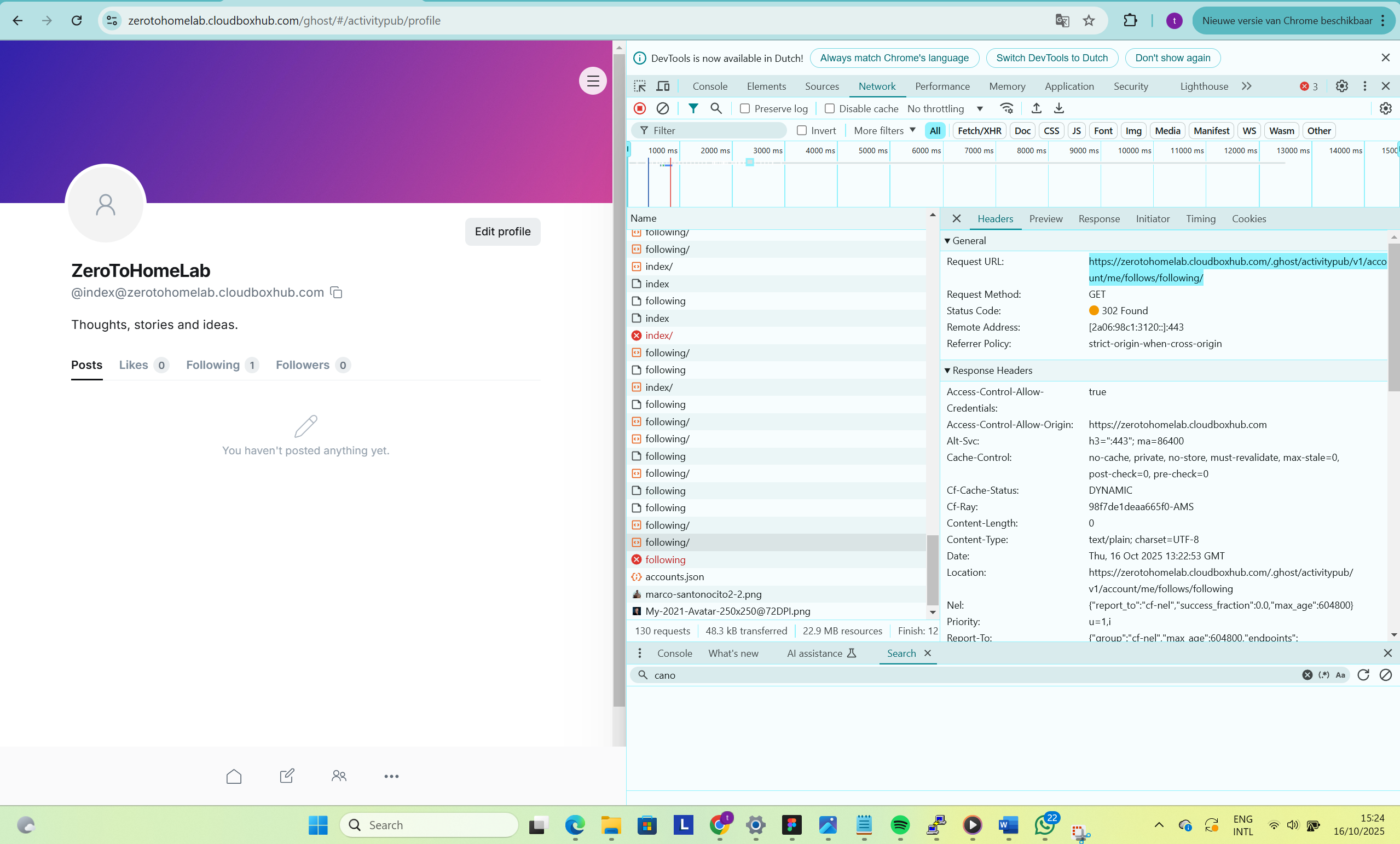
When your browser or Ghost Admin calls a private ActivityPub endpoint, for example the endpoint to get the list of accounts you follow:
https://yourdomain.com/.ghost/activitypub/v1/account/me/follows/following/
your Nginx proxies that to https://ap.ghost.org. If the gateway needs you to be authenticated, it might respond with a 302 redirect or a Set-Cookie.
With the orange cloud enabled:
- Cloudflare terminates HTTPS at its edge.
- During redirects and cross-origin flows, authorization and cookie headers can be dropped or blocked.
- The gateway never sees a valid session → it keeps sending 302 / 403 back.
- The Ghost Admin UI keeps failing those private ActivityPub calls, even though public ones (WebFinger, NodeInfo, actor JSON) work fine.
Option 1 – Turn off the orange cloud
The only fully reliable fix is to disable the orange cloud for the hostname you use for Ghost (set it to DNS only in Cloudflare):
- All headers and cookies reach
ap.ghost.orgintact. - Ghost Admin’s ActivityPub UI works normally.
- ⚠️ Your origin IP becomes public — use HTTPS and a firewall limited to ports 80/443.
💡 Note: If you’re using a Cloudflare Tunnel, this option won’t help, tunnels always route through Cloudflare’s edge network, so the same header and redirect issues still apply. For now, the best workaround is the “manual URL” method or hosting Ghost on a non-Cloudflare domain.
Option 2 – Use the “manual URL” workaround
If you want to keep the orange cloud enabled, there’s a quick (but temporary) trick:
- Copy a private ActivityPub URL (like
https://yourdomain.com/.ghost/activitypub/v1/account/me/follows/following/) - Paste it into your browser’s address bar and hit Enter.
- It might 302 the first time — reload once.
You’ll now see 200 OK with JSON.
I’m not 100% sure why this works, but it seems the full-page visit lets the browser accept a session cookie that Cloudflare normally blocks during background requests. Once that cookie is set, reloads work until it expires. You will need to do this for all the urls that are failing.
Public federation (followers, posts, discovery) works fine either way — the Cloudflare issue only affects Ghost Admin’s private ActivityPub endpoints.
🧩 Final Thoughts
Getting ActivityPub working on a self-hosted Ghost 6 setup isn’t exactly plug-and-play, especially when you throw Cloudflare or an other reverse proxy into the mix.
It took some digging, a few 302 loops, and more than one “why does this suddenly work now?” moment to figure it out.
The good news is: once it’s running, it just works.
Your blog becomes part of the fediverse, people can follow it from Mastodon, and your posts show up like any other federated article.
Ghost’s ActivityPub support is still new and a little opinionated (mainly designed for Ghost(Pro)), but it’s awesome that self-hosters can join the network with just a bit of reverse-proxy magic.
Hopefully, future versions will make this easier out of the box.